
Edge, Cloud, and Server Deployment for Utilities
Compare where utility data is processed, where applications are hosted, and who is responsible for keeping each part of the system available. A practical architecture places every workload according to its response time, connectivity, data-handling, integration, and operational requirements.
Explore deployment models ↘Choose a deployment model around the workload
Deployment choices determine where utility data is processed, where applications are hosted, and who is responsible for keeping each part of the system available. For electric utilities, the decision may involve remote distribution substations, transformer monitoring points, feeder equipment, utility operations centers, and enterprise data environments.
For Physical AI and the Artificial Intelligence of Things (AIoT), deployment is not simply a choice between edge and cloud. A practical design may use local processing for time-sensitive monitoring, a customer-managed server for operational applications, and cloud services for broader analysis. Each function should be placed according to its operational purpose and failure behavior.
Compare Deployment Models Before Selecting One
This matrix is a decision aid, not a claim that every arrangement is available or supported in a particular UtilityGrid installation. Actual performance depends on site conditions, hardware, network design, software, and service agreements.
| Decision factor | Field edge | On-site server | Private hosting | Cloud services |
|---|---|---|---|---|
| Connectivity | Can continue selected local functions during WAN loss; remote management still needs a path. | Usually depends on the utility LAN and site-to-center links. | Depends on provider connectivity and agreed network paths. | Depends on reliable external connectivity for remote functions. |
| Response needs | Best suited to local filtering, event capture, and approved low-latency tasks. | Suitable for centralized operational applications across connected sites. | Depends on network path and hosting arrangement. | Best for functions that tolerate network transit and service dependency. |
| Data handling | Can minimize raw-data transfer; local retention must be managed. | Data remains in a utility-managed environment. | Terms must define data location, access, retention, and export. | Requires review of data location, access, retention, and applicable policy. |
| Maintenance | Distributed devices require inventory, patching, monitoring, and field support. | Utility team manages server lifecycle, backups, and recovery. | Responsibilities are divided by contract. | Provider manages underlying infrastructure; customer still manages application, identity, data, and configuration. |
| Expansion | Scale-out may require additional site devices and field work. | Capacity is bounded by the installed environment unless expanded. | Capacity depends on the hosting contract and architecture. | Elastic capacity may be available, subject to configuration and cost controls. |
| Cost categories | Device, enclosure, installation, connectivity, support, and replacement. | Server, storage, facilities, licenses, staffing, backup, and refresh. | Hosting, connectivity, support, data transfer, and contract costs. | Compute, storage, transfer, support, monitoring, and service charges. |
Use a Hybrid Architecture for Distinct Workloads
A hybrid architecture assigns each workload to the location that best fits its timing, data, and availability requirements. It does not require every component to run in every location.
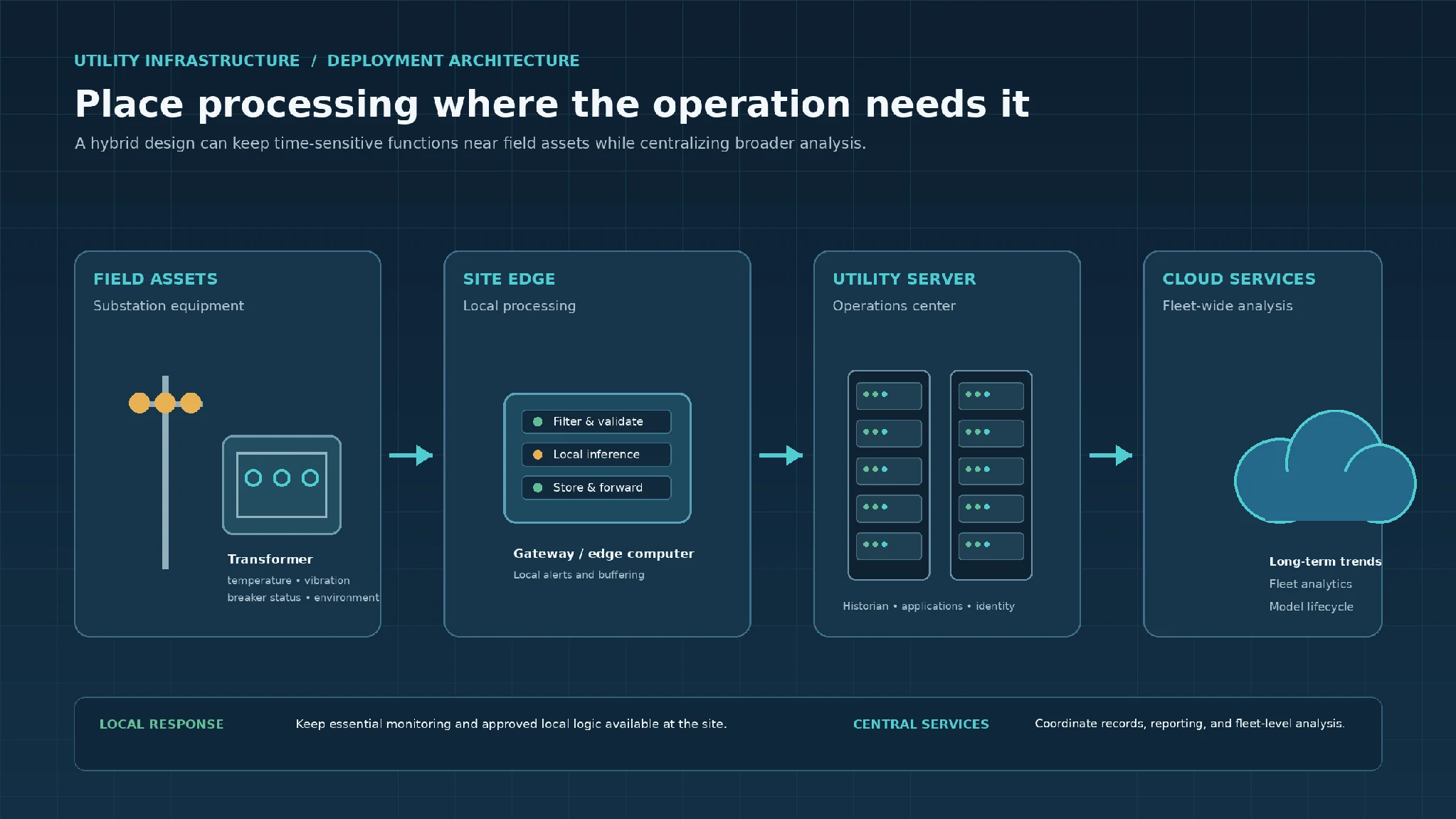
Utility edge, server, and cloud architecture for substation monitoring. The visual distinguishes local monitoring and buffering from centralized operational records and fleet-level analysis.
Illustrative substation monitoring workflow
Sensors and equipment interfaces produce transformer temperature, vibration, breaker-status, and enclosure-environment observations. A site gateway checks timestamps, units, asset associations, and data quality. It can retain readings locally and run approved threshold or anomaly-screening logic where that function has been evaluated for the intended conditions.
Selected events and histories are forwarded to an operations-center server for cross-site review and maintenance workflows. Cloud services may be considered for longer-term fleet analysis or model-development tasks if the utility’s security, data, and connectivity requirements allow.
This is a conceptual arrangement, not a statement that a specific connector, model, or deployment has been tested. The utility must confirm interfaces, access permissions, equipment compatibility, and acceptance criteria before implementation.
Local acquisition
Determine whether the gateway must continue collecting sensor and equipment-interface data without a remote connection.
Data validation
Define checks for missing values, invalid units, out-of-range readings, duplicate messages, and incorrect asset associations.
Local alerts
Identify which alarms can be generated locally, who receives them, and what happens if remote notification is unavailable.
AI inference
Decide whether a model must run at the edge or can wait for centralized processing. Define behavior for stale inputs, low confidence, and operating conditions outside the model’s evaluation set.
Operational workflows
Identify whether maintenance recommendations, work-order creation, or approval steps require a central application.
Physical action
Keep control authority, interlocks, and independent protective functions within their engineered boundaries. A remote AI recommendation or software command must not bypass established utility control and safety procedures.
Plan for Communications Outages and Recovery
A deployment design should describe what happens during a wide-area network (WAN) interruption, a site-LAN fault, a server outage, or a cloud-service disruption. Do not assume that a system will simply resume normal operation when connectivity returns.
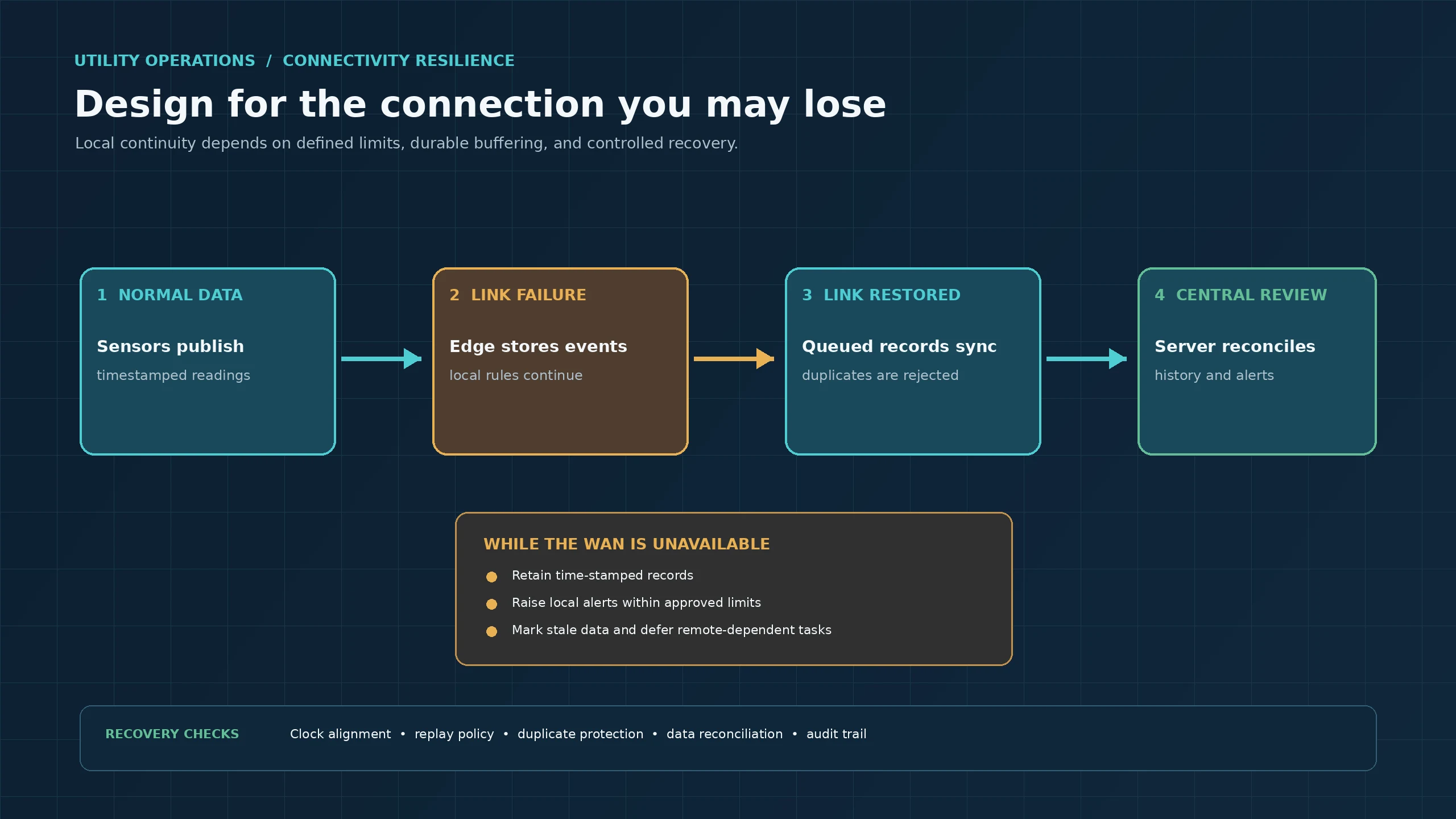
Utility substation connectivity outage and data recovery workflow. It illustrates normal event delivery, local buffering during a communications failure, and controlled synchronization after connectivity returns.
Continue only validated local functions
A remote substation edge gateway may continue collecting selected measurements and storing time-stamped events in a local queue. Local monitoring can continue only for functions designed and validated for standalone operation. Remote-dependent workflows may need to be delayed, restricted, or stopped.
Replay buffered records safely
When connectivity returns, forward buffered records using a documented replay policy. Each record needs a stable event identifier or another reliable method for duplicate detection. The receiving application should handle repeated delivery without processing the same event more than once.
Test the recovery path
Check time alignment, event ordering, duplicate handling, missing records, storage limits, retry behavior, rejected messages, and reconciliation against the source gateway. A successful network reconnection is not proof that all data has been recovered or that a physical operation completed.
Evaluate Security, Operations, and Lifecycle Ownership
Deployment decisions also determine who can access systems, approve changes, respond to incidents, and restore service. Define these responsibilities before a pilot or production rollout.
Network boundaries
Document connections between field devices, OT networks, enterprise IT, remote administration paths, and external hosting environments. Use approved segmentation and controlled conduits.
Identity and access
Assign named users and service identities, apply least-privilege permissions, and separate administrative access from routine operational use.
Software maintenance
Identify who reviews, tests, approves, schedules, and rolls back gateway firmware, operating-system updates, application releases, and AI model versions.
Monitoring
Define health signals for edge devices, storage capacity, data freshness, service availability, failed transfers, and security events.
Backups and recovery
State what is backed up, where copies are stored, who can restore them, and how recovery procedures are tested.
Data governance and support
Define ownership, retention, permitted use, export formats, deletion responsibilities, and response ownership for field hardware, networks, servers, hosted services, applications, and model behavior.
For systems that can influence equipment operation, preserve separation between AI-supported recommendations and validated control functions. Any command path must have an identified authority, permitted operating limits, failure handling, and a method to verify the resulting physical state. A command acknowledgment alone does not confirm that equipment reached the requested state.
Compare Total Cost Categories, Not Hosting Fees Alone
A fair comparison includes the full operating lifecycle. Do not select a model using a generic price estimate. Build a project-specific cost register and compare options over the same planning period.
Field edge
Ruggedized devices, enclosures, power conditioning, field installation, spares, distributed maintenance visits, connectivity, and replacement.
On-site server
Hardware refresh, storage, facilities, backup, monitoring, licenses, staffing, and operational support.
Private hosting
Recurring hosting, connectivity, support, data transfer, service levels, and contract costs.
Cloud services
Compute, storage, data transfer, support, monitoring, and service charges.
Shared costs
Cybersecurity controls, integration work, training, testing, application maintenance, and outage or service limitations.
Include quantities, expected service life, support coverage, installation assumptions, data volumes, retention periods, recovery requirements, and the labor needed to operate the system.
Example Deployment for a Remote Distribution Substation
Assume a utility wants to review transformer condition measurements at several remote distribution substations. Some sites have constrained backhaul connectivity, and the utility needs a central view for maintenance planning. The initial objective is monitoring and decision support, not autonomous switching or replacement of protection equipment.
Possible starting design
Place data acquisition, quality checks, local buffering, and selected alert logic on an industrial edge gateway at each site. A customer-managed operations-center server could receive normalized events, maintain a shared history, and present condition information to authorized engineering and maintenance staff.
Evaluate cloud separately
Cloud services could be evaluated for long-term fleet analytics if approved by the utility’s data governance and security teams. This recommendation assumes local collection is needed during WAN interruptions, central review across sites is useful, the initial workflow does not issue direct control commands, and the utility can maintain site gateways and its central server.
If connectivity is consistently reliable, local processing needs are limited, or the organization lacks server support capacity, a different balance may be appropriate. Revise the design when site surveys, interface tests, data volumes, and support responsibilities are known.
Deployment Selection Checklist
Use these questions to structure a deployment assessment before choosing infrastructure or expanding a pilot.
Frequently Asked Questions
What is the difference between edge computing and cloud computing?
Edge computing processes data near the equipment or site where it is generated. Cloud computing uses remote infrastructure and services. Edge can support local monitoring and buffering; cloud can support centralized storage and analysis when connectivity and governance requirements are satisfied.
Should utility AI run at the edge or in the cloud?
Place a workload according to its response-time, connectivity, data, and support requirements. Local inference may be appropriate when a site needs a prompt result during a network interruption. Cloud or central-server inference may suit workloads that use data from multiple sites or can tolerate network delay. Evaluate each model under representative operating conditions.
Can a utility edge gateway keep working when the network is down?
It can continue only the functions designed for local operation, such as selected data collection, validation, buffering, and approved local alerts. Remote-dependent workflows may be delayed or unavailable. The design must define storage limits, stale-data handling, and recovery behavior.
When is an on-site server preferable to cloud hosting?
An on-site server may be preferable when the utility needs direct control over its hosting environment, has established data-center operations, or must keep selected applications within a managed internal environment. The utility must also be prepared to operate, secure, back up, and refresh that infrastructure.
What should be tested before deploying a hybrid utility architecture?
Test data quality, asset association, timestamp handling, interface behavior, permissions, local operation, network interruption, buffering, replay, duplicate handling, backup restoration, and user workflows. For any physical action, separately validate authority, safeguards, and the observed equipment outcome.
Plan the Deployment Around a Real Utility Workflow
The most useful starting point is a defined asset group and operating question, not a hosting preference. UtilityGrid can help frame deployment requirements for a Physical AI or AIoT workflow, including field data, edge processing, server and cloud responsibilities, integration boundaries, and outage testing.